
A good character builder helps you turn “I want to play a druid” into a character you can bring to the table. The best DND character creators make the choices understandable, keep the numbers manageable and give you a sheet that suits the way your group plays.
For a guided build and a printable DND Den sheet, our first picks are the 2024 DND Character Creator and the 5e DND Character Creator. Both are free and require no account. If your campaign already lives in D&D Beyond, Roll20 or another virtual tabletop, staying within that system may be more convenient.
This is DND Den’s editorial top ten, with our own two tools leading the list for their guided, printable-sheet workflow. We compare eight other creators using their developers’ published features and limitations, checked 3 November 2026. The right choice depends on your rules edition, available character options and whether you want paper, a phone or a shared tabletop.
Compare the ten D&D character builders
Start with the rules your DM is using. “5e” can mean the original 2014 rules or the revised 2024 rules, now also called 5.5e by some providers. Our 2014 versus 2024 D&D comparison explains the difference. When comparing DND character creators, edition support matters more than a long feature list.
| Creator | Rules support | Best fit |
|---|---|---|
| #1 · DND Den 2024 Creator | 2024 | Guided builds and class-specific PDFs |
| #2 · DND Den 5e Creator | 2014 | Legacy rules with source controls |
| #3 · D&D Beyond | 2014 and 2024 | Official digital books and campaigns |
| #4 · Roll20 Characters | 2014 and 2024 | Characters for Roll20 games |
| #5 · Shard Tabletop | 2014 and 2024 | Creation and play in one tabletop |
| #6 · Dungeon Master’s Vault | 2014-era 5e | Homebrew-focused browser builds |
| #7 · DiceCloud | Depends on content libraries | Customisable, inspectable automation |
| #8 · MPMB’s Character Record Sheet | Separate 2014 and 2024 versions | Automated PDFs on desktop |
| #9 · Fight Club 5th Edition | SRD 5.1; native 2024 support unconfirmed | Mobile sheets with PDF backup |
| #10 · Fifth Edition Character Sheet | Classic 5e; native 2024 support unconfirmed | A straightforward mobile character sheet |
“Free” also needs a closer look. A free download may limit character slots, offer only basic rules or charge for additional features. Paying for a subscription does not necessarily unlock every sourcebook. Each entry below separates the useful starting point from the limitation to check.
#1. DND Den 2024 Character Creator: Guided choices and a sheet for your class
Best for: players using the revised 2024 rules who want a free browser builder and an editable, printable character sheet.
The 2024 DND Character Creator takes you through class, origin, abilities, training, features, spells and equipment. It supports levels 1–20, the twelve core classes and multiclass planning, with choices checked against your selected levels. You can work through the build on desktop or mobile without registering an account.
The finished character downloads onto DND Den’s class-specific, editable PDF sheets. Optional reference pages keep useful feature and spell information nearby. That suits players who enjoy making decisions on screen but want a paper sheet beside their dice during the session.
What to know: the creator keeps one current draft in that browser, rather than a cloud character library. Download the finished PDF before replacing the draft or clearing browser storage. Keep your rulebooks available for complex tables and creature statistics, and account for temporary effects during play.
Create a 2024 D&D character. If you are still deciding what to play, our guide to D&D classes can help you find a role you will enjoy.
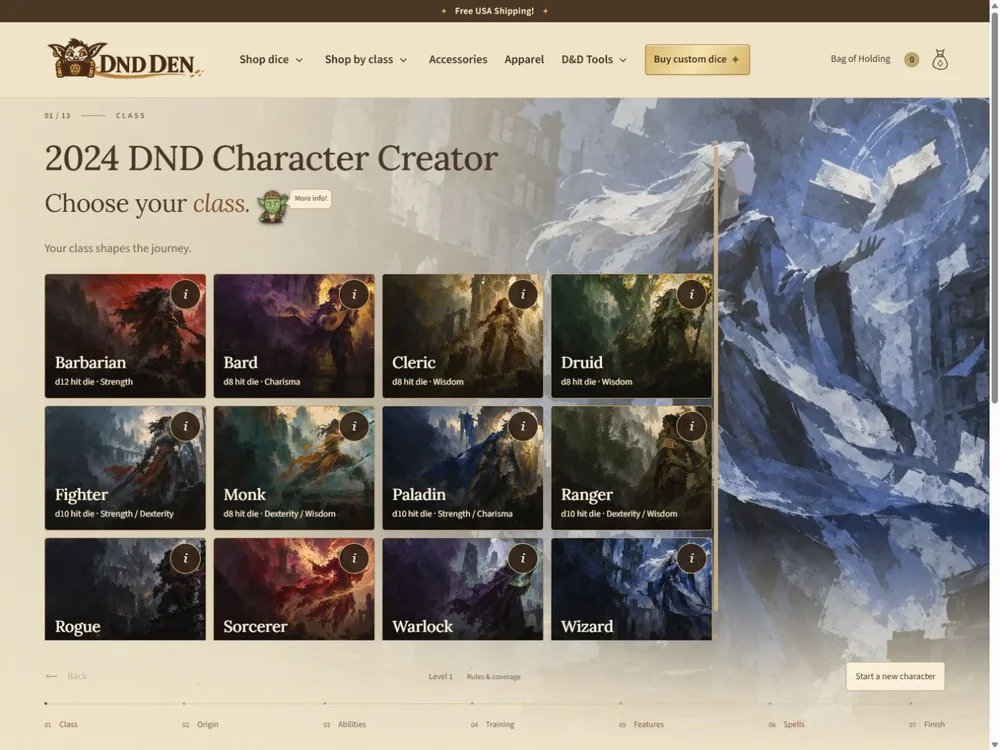
#2. DND Den 5e Character Creator: Keep your 2014 campaign on its own rules
Best for: groups staying with the original 2014 fifth-edition rules and players who want control over allowed books and optional rules.
The 5e DND Character Creator is a separate, free builder for levels 1–20. It begins with your campaign’s source choices, including the Player’s Handbook, Xanathar’s Guide to Everything and Tasha’s Cauldron of Everything. Feats, multiclassing and supported optional features have their own switches. The Artificer becomes available when the relevant Tasha’s source is enabled.
From there, you choose race or heritage, background, ability scores, skills, class options, spells and equipment. The download uses editable DND Den sheets, with additional pages when needed and optional references. It is a useful way to keep a long-running 2014 campaign consistent while still having a guided creation process.
What to know: its browser draft is separate from the 2024 creator’s draft, but it is still local to your device and browser. It does not reconstruct every historical retraining choice or campaign-found magic item. Agree on the source switches with your DM, then save your PDF.
Build a character with the 2014 rules, or browse our free D&D character sheets if you prefer to fill one in yourself.
#3. D&D Beyond: Best for an existing Beyond campaign
Best for: players who already use D&D Beyond’s digital books and campaign tools.
D&D Beyond’s official character builder combines guided creation with digital sheets and browser/app synchronisation. It supports both 2014 and 2024 rules, and its free account includes six character slots. Paid subscriptions add unlimited slots and other benefits.
You can also export a form-fillable character PDF. For a group already sharing eligible books through a Beyond campaign, this can keep character options and play in one familiar place.
What to know: a subscription is not an automatic unlock of every published book. Check whether the exact subclass, species and other options you want are available through your account or campaign before committing to the build.
#4. Roll20 Characters: Best for bringing a sheet into your virtual tabletop
Best for: groups that already play their sessions on Roll20.
Roll20 Characters connects character creation with Roll20’s tabletop. Its current D&D sheets support 2014 and 2024 content, with compendium tools and controls for spells, equipment and character features. You can create characters and bring them into your Roll20 games.
The current mobile-browser experience supports accessing and editing D&D sheets on phones and tablets. That is useful when you want your character on a second screen while the map stays on a laptop.
What to know: free rules provide a limited set of options; sourcebook access and automation coverage vary. Character-transfer allowances also depend on the game’s setup. Check those details before moving an entire party. Full map and token interaction remains a desktop or laptop workflow.
#5. Shard Tabletop: Best for building and playing in one browser tool
Best for: players and DMs who want character creation alongside a virtual tabletop and campaign tools.
Shard Tabletop handles creating, levelling and playing characters in a browser. Its game-system settings explicitly support both 2014 and 2024 D&D, and the publisher offers a free 2024 character-options compatibility pack.
The free core includes SRD material, while subscriptions and marketplace products add content or capabilities. Shard also supports modelling custom classes, backgrounds, spells and other options, which can appeal to a group building a distinctive campaign.
What to know: compatibility packs supply mechanical components for use with your books; they are not complete copies of those books. Check the campaign’s selected rules and free-versus-paid features before inviting everyone into a new setup.
#6. Dungeon Master’s Vault: Best for a homebrew-focused 5e builder
Best for: 2014-era fifth-edition players who want tools for their own character options.
Dungeon Master’s Vault is a free, community-supported browser builder. Alongside character creation, it provides tools for custom classes, subclasses and items. Its .orcbrew format helps organise and transfer custom content.
The provider documents PDF and shareable-link output, so a character can leave the builder in a useful form. For a homebrew campaign, the attraction is being able to shape the options around the table’s agreed rules.
What to know: treat it as an SRD 5.1/2014-oriented tool; native revised 2024 support was not confirmed. Its official limitations page also warns that long Features & Traits text can be cut off in the PDF. Inspect the exported sheet before relying on it at the table.
#7. DiceCloud: Best for players who want to understand the calculations
Best for: players comfortable configuring a flexible digital sheet and inspecting how its statistics work.
DiceCloud emphasises auditable calculations: you can follow where a number comes from and how changes to equipment or features affect the sheet. Its open-source project offers a free core, with Patreon-supported hosted features.
Character setup uses content libraries, so check the edition and source of the libraries you choose. DiceCloud also supports an Avrae import workflow for Discord play, which can make it useful beyond a standalone character sheet.
What to know: the developer notes that initial setup can take longer than filling in a paper sheet. This is a good trade-off for players who value control, but a tightly guided beginner wizard may suit a first character better. Library flexibility does not guarantee complete coverage of every official option.
#8. MPMB’s Character Record Sheet: Best for automated PDFs
Best for: players who want to build and maintain an automated PDF on a computer, then print it for play.
MorePurpleMoreBetter’s Character Record Sheet, usually called MPMB, puts character creation and calculations inside a form-fillable PDF. Its download page lists separate 2014 and 2024 versions and a pay-what-you-want option, including a free option. Additional pages can cover spells, companions, Wild Shape and notes.
This is a different workflow from a hosted builder: the PDF is your working character document, and local use suits offline play.
What to know: the automation requires desktop Adobe Acrobat. Browser PDF viewers and mobile readers do not provide the full experience. Check the compatibility and content guidance before downloading; built-in SRD material and user-added scripts are different from a complete official book library.
#9. Fight Club 5th Edition: Best for a phone-based sheet with PDF backup
Best for: players who want a mobile character sheet, spellbook and equipment tracker.
Lion’s Den’s Fight Club 5th Edition for iPhone and iPad is also available on Android. It calculates character statistics, tracks spells and equipment, includes dice rolling and can generate a printable character-sheet PDF.
The free app allows one character with advertising. A premium in-app purchase removes ads and allows unlimited characters, making the free version a practical way to assess the interface before upgrading.
What to know: its included compendium is based on SRD 5.1 and does not contain the whole Player’s Handbook. Missing entries need setup. The developer listings do not confirm native 2024 automation, so do not assume importing new text also updates every underlying rule.
#10. Fifth Edition Character Sheet: Best for a straightforward mobile starting point
Best for: players who mainly want a quick level-one builder and an editable sheet on their phone.
Walter Kammerer’s Fifth Edition Character Sheet for Android, also available for iPhone and iPad, combines guided level-one creation with a customisable five-page character sheet. It calculates common statistics and keeps spells, equipment and notes together.
You can create and save multiple characters and hide or reorder sheet pages. The download is free with in-app purchases; the Android listing also includes advertising.
What to know: its developer descriptions do not confirm full revised 2024 support. Treat it as a classic fifth-edition option and verify edition-specific choices with your DM. Character import/export is useful, but it should not be confused with a verified printable PDF feature.
How to choose the right character creator for your campaign
The most useful DND character creators fit the way your group already plays. Before building a complicated character, answer four questions:
- Which rules and books are allowed? Confirm 2014 or 2024, then check subclasses, species or races, backgrounds and optional rules. A builder should follow those decisions.
- Where will you use the sheet? Paper-table players may value editable PDF downloads. Online groups may value a sheet connected to their campaign’s virtual tabletop.
- What happens to your saved character? A local browser draft, a downloaded PDF and an account-based library are different. Know where your lasting copy lives.
- What does free actually include? Check character limits, book access and paid features separately. Confirm the options you need before spending an evening on the build.
For your first character, a clear concept is more useful than opening every available option. Choose a class you like, establish why the character adventures, then work through the rules. Our step-by-step character creation guide gives you a starting process; the character sheet guide explains where the finished information belongs.
Frequently asked questions about D&D character builders
Which character creator is best for a beginner?
For a guided build that ends in a printable sheet, start with the DND Den creator matching your rules edition. If your DM already uses a shared online campaign, ask which builder connects to it. Familiar support from your group can matter more than having the longest feature list.
Are there free D&D character creators without an account?
Yes. DND Den’s 2024 and 2014 creators are free and require no account. Their current drafts stay in the browser, so download the completed sheet as your lasting record. They do not provide an account-based cloud character library.
Can a 2014 character builder make a 2024 character?
Only when the tool explicitly supports the revised rules or you deliberately make and check the adjustments yourself. Editable fields and custom imports are not proof of full 2024 automation. When choosing DND character creators, check edition support before relying on calculated features, spell choices or progression.
Which tools can export a printable character sheet?
Both DND Den creators download editable PDFs. D&D Beyond, Dungeon Master’s Vault and Fight Club document PDF output, while MPMB is an automated PDF itself. Export formats and long-text handling differ, so open the finished file and review it before your session.
Do I still need to understand the rules?
Yes. A builder helps organise choices and calculate statistics, but your group still decides which rules apply. Learn what your character’s main actions do, check any unusual interactions with the DM and keep relevant books available. For a broader starting point, read how to play D&D.
Build the character, then bring them to the table
Good DND character creators reduce the work between an idea and a playable character. Choose DND Den’s 2024 creator for revised rules or the 5e/2014 creator for an established legacy campaign. If your group needs a shared digital tabletop, use the comparisons above to find the tool that fits it.
Once the sheet is ready, check your abilities, save a copy and bring a character you are excited to play. Our guide to the dice you need for D&D covers the small pile of polyhedrals that comes next.